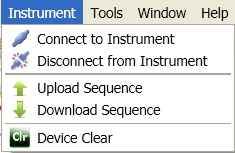
Select this menu item to open a VISA session to the EXT test set.
Select this menu item to close the current VISA session with the EXT test set.
Select this menu item to upload the sequence from the connected instrument and display it in the Sequence Studio application. Note that Upload Sequence only loads the analyzer sequence and source sequence -- it does not upload instrument settings from the connected instrument (to do that, use the Upload Instr Settings button on the Instrument Settings tab).
Select this menu item to download the sequence in the Sequence Studio application to the connected instrument. Note that Download Sequence only loads the analyzer sequence and source sequence -- it does not download instrument settings to the connected instrument (to do that, use the Download Instr Settings button on the Instrument Settings tab).
Select this menu item to send a Device Clear to the connected instrument.